Instagram Post Size in 2026: The Sizes That Matter
Every few months someone declares that Instagram's image dimensions have changed, and a fresh wave of panic ripples through content calendars everywhere. The truth is far less dramatic. Instagram's core sizes have been stable for years, and in 2026 you only need to remember a handful of numbers to make everything you post look sharp. This guide gives you those numbers, explains when to use each one, and then gets out of your way so you can stop measuring and start posting.
The one number that fixes almost everything
If you take nothing else from this article, take this: export your images at 1080 pixels wide. Instagram displays photos at 1080px across on modern screens, and feeding it exactly that width means the platform never has to upscale a small file or crunch down a giant one. A picture that arrives too small gets stretched and turns soft; one that arrives enormous gets re-compressed and picks up ugly artifacts. Hand Instagram a clean 1080px-wide file and most quality problems simply disappear. The only thing left to decide is how tall that image should be, and that comes down to the shape, or aspect ratio, you choose.
The three feed shapes and their exact pixels
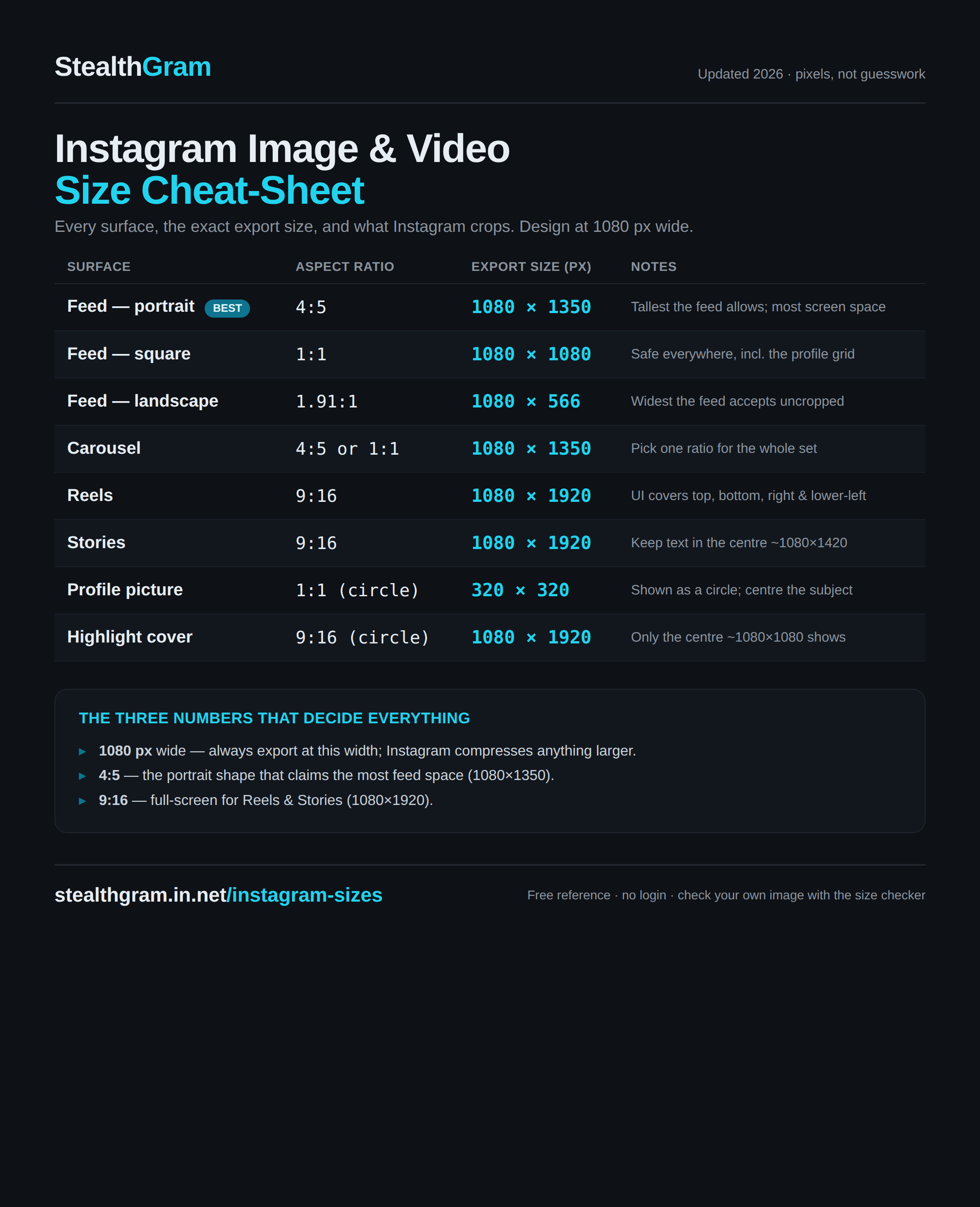
Regular feed posts come in three shapes. Here are the dimensions worth committing to memory:
| Shape | Aspect ratio | Pixel size | Best for |
|---|---|---|---|
| Portrait | 4:5 | 1080 × 1350 | Almost everything |
| Square | 1:1 | 1080 × 1080 | Grids, carousels |
| Landscape | 1.91:1 | 1080 × 566 | Wide scenes, some links |
Portrait at 1080 × 1350 is the one to default to. It occupies the most vertical space a single feed post is allowed, so a thumb scrolling past has to travel further before your image leaves the screen. More screen time means more attention, which is why creators who care about reach lean on the 4:5 frame for the bulk of their posts.
Square (1080 × 1080) is the old classic. It no longer dominates the way it did in Instagram's early years, but it still has a real job: when you want a tidy, predictable grid on your profile, squares line up perfectly and nothing gets awkwardly cropped in the thumbnail view. It is also a safe, forgiving choice for carousels where you want every slide to feel uniform.
Landscape (1080 × 566) is the shape most people should use least. It gives you the smallest footprint in the feed, so it wastes the vertical real estate that helps you get noticed. Reach for it only when the content genuinely demands width, like a panoramic photo or a wide screenshot that would lose its meaning if squeezed into a taller frame.
Reels and Stories: one size, full screen
Everything that plays full-screen and vertical, Reels and Stories alike, uses the same dimension: 9:16, or 1080 × 1920. Fill that entire canvas with your footage or graphic, but keep anything important, text, faces, logos, away from the very top and very bottom. Instagram lays its own interface over those edges: your profile handle and caption sit near the top, while buttons, the caption preview and the progress bar crowd the lower strip. A rough habit of leaving around 15 percent of clear space at the top and bottom keeps your message from hiding behind the app's own buttons. If you plan your posts around a single reference for all the common surfaces, a compact list of Instagram post sizes is easier to keep open than a mental checklist you have to second-guess every time.
Profile picture and the banner that does not exist
Your profile picture is a small detail people underrate. Instagram displays it as a circle and renders it at roughly 320 × 320 pixels. Upload a clean square image and let the platform mask it into a circle. Because it shows up tiny, especially in the feed and comments, keep the subject centered and simple. A single face or a bold logo mark reads clearly at that size; a busy full-body shot or dense text turns to mush.
Here is a point of confusion worth clearing up directly: Instagram has no cover or banner photo. Unlike Facebook, LinkedIn, or YouTube, an Instagram profile is built from your profile picture, your bio text, your highlights, and your grid of posts. There is no wide header image to design. If a template pack or an outdated tutorial tells you to prepare an "Instagram banner," it is describing a feature that does not exist on the platform. Don't waste an afternoon making one.
How to stop over-thinking it
The reason size anxiety persists is that people treat every post as a fresh puzzle. It isn't. A tiny set of defaults covers the overwhelming majority of what you will ever post:
- Feed photo or carousel: 1080 × 1350 portrait, unless you specifically want a square grid.
- Reel or Story: 1080 × 1920, full screen, safe margins top and bottom.
- Everything: exported at 1080px wide, high quality.
Set those as templates in whatever tool you design with, Canva, Figma, Photoshop, or your phone's editor, and the decision disappears. You never measure again; you just drop art into a frame that is already the right shape. When you do want a printable reminder to pin above your desk or share with a teammate, a one-page Instagram size cheat-sheet collects every number here in a form you can glance at without opening a browser tab. Beyond that, resist the urge to chase rumored size changes. Instagram's feed and full-screen dimensions have held steady for a long time, and the platform is generous about accepting slightly different ratios and adapting them. Nail the width, pick the shape that suits the content, and spend your energy on the picture itself, which is the part your audience actually cares about.
Frequently asked questions
What is the best Instagram post size in 2026?
For a standard feed post, 1080 × 1350 pixels (a 4:5 portrait) is the strongest default. It takes up the most vertical space allowed, giving your post more time on screen as people scroll.
Does Instagram still support square posts?
Yes. Square posts at 1080 × 1080 pixels work perfectly well and are still a good choice when you want an even, uniform look across your profile grid or a carousel.
What size should a Reel or Story be?
Both use a full-screen vertical format of 1080 × 1920 pixels (9:16). Keep key text and faces clear of the top and bottom edges so Instagram's own buttons and captions don't cover them.
What are the dimensions of an Instagram banner?
Instagram has no banner or cover photo. Profiles are made up of a circular profile picture (about 320 × 320 pixels), your bio, highlights, and your feed. There is no wide header image to create.
Why should I always export at 1080 pixels wide?
Instagram displays images at 1080px wide, so matching that avoids both upscaling a too-small file and heavy re-compression of an oversized one. Exporting at 1080px wide keeps your images crisp.